
Notice
Recent Posts
Recent Comments
Link
| 일 | 월 | 화 | 수 | 목 | 금 | 토 |
|---|---|---|---|---|---|---|
| 1 | 2 | 3 | ||||
| 4 | 5 | 6 | 7 | 8 | 9 | 10 |
| 11 | 12 | 13 | 14 | 15 | 16 | 17 |
| 18 | 19 | 20 | 21 | 22 | 23 | 24 |
| 25 | 26 | 27 | 28 | 29 | 30 | 31 |
Tags
- new&delete
- std::vector
- dynamic_cast
- conversion constructor
- increment operator
- discord bot
- base from member
- virtual inheritance
- constructor
- vector size
- std::endl
- virtual function table
- std::cout
- c++ multi chatting room
- member function pointer
- return by reference
- C++
- suffix return type
- this call
- 더 지니어스 양면포커
- placement new
- virtual function
- pointer to member data
- std::ostream
- c++ basic practice
- virtual destructor
- diamond inheritance
- operator overloading
- delete function
- vector capacity
Archives
- Today
- Total
I'm FanJae.
[C++] Visual Studio C++ 언어 표준 설정. 본문
Visual Studio 2022 기준으로 표준은 C++ 14이다.
따라서, C++ 17, 20에 새롭게 정의된 Class를 사용시 에러가 발생한다.

1. 해결법
1) 프로젝트->프로젝트 속성 탭을 클릭한다.
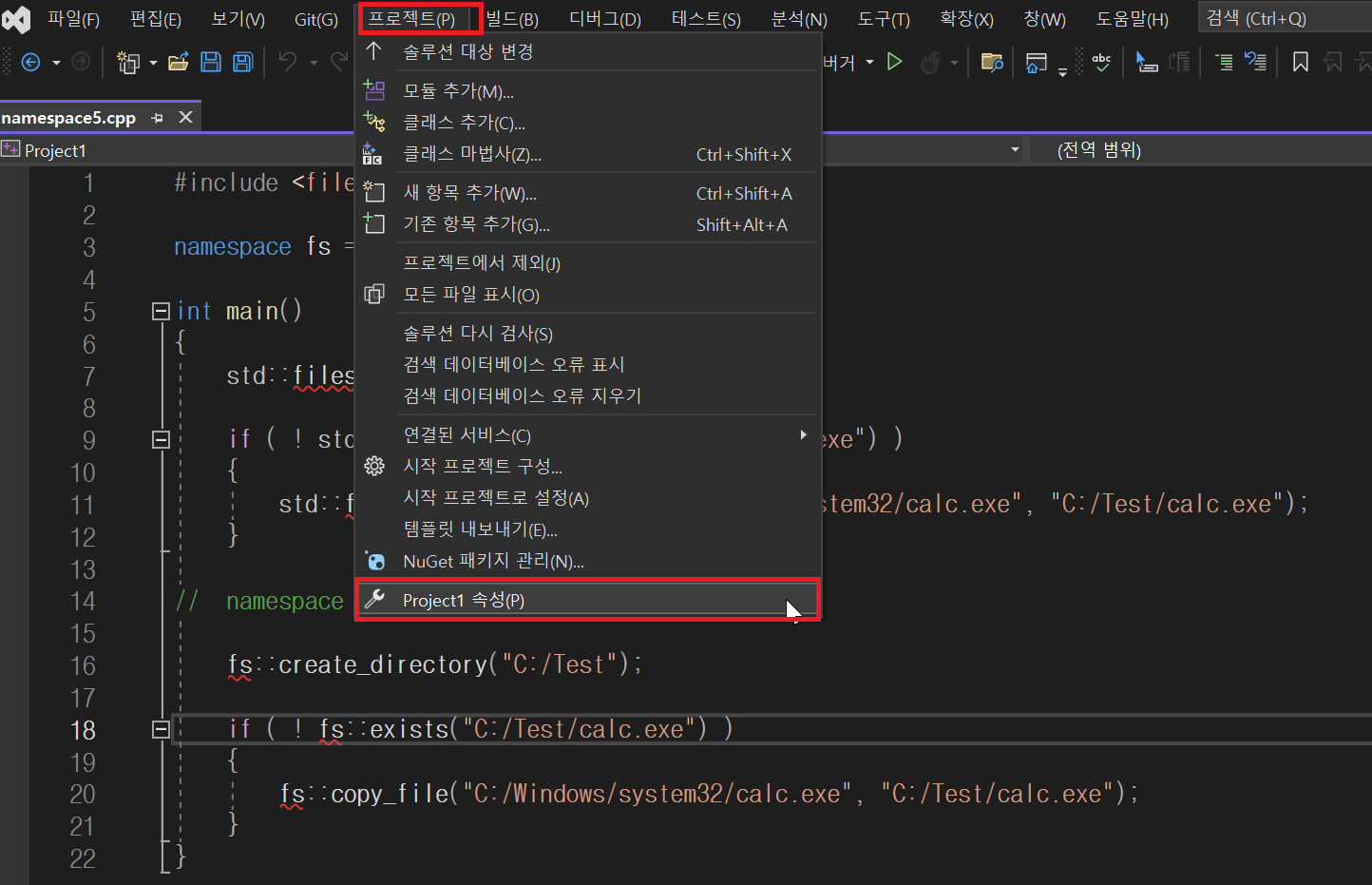
2) 구성 속성 -> C/C++ -> 언어 -> C++ 언어 표준의 옵션을 본인이 원하는 버전으로 변경한다. 변경 후 적용 버튼을 누른 뒤 확인을 누르면, 정상적으로 변경이 되었음을 확인할 수 있다.

적용 이후, 오류가 나지 않고, 정상적으로 인식한 것을 확인할 수 있다.

'C++ > Basic' 카테고리의 다른 글
| [C++] Function II (2) | 2024.08.08 |
|---|---|
| [C++] Function I (0) | 2024.08.07 |
| [C++] C++ 에서 새롭게 추가된 Type & Variable (0) | 2024.08.06 |
| [C++] 표준 입출력 정리 (0) | 2024.08.06 |
| [C++] namespace 정리 (1) | 2024.08.05 |
'C++/Basic' Related Articles
more

Comments